
Windows application in development
StorageProof

Know what your drive can really hold.

StorageProof is being built to bring capacity verification, speed testing, corruption detection, and plain-language results into one careful Windows application.

Windows 10 & 11 planned Free download planned Safety first
StorageProof
Guided test · Step 1 of 7 Read-only

Choose the drive you want to test

StorageProof will verify the drive again before any test writes data.

EATOP USB Device (D:) Removable drive · Reported capacity 1.01 TB 1.01 TB
This drive contains files. Nothing will be changed during the initial inspection.
Continue safely   →
Development began September 24, 2026
Developer James E. Hamelton Jr.
Development studio JIJ Web Solutions
Project Proof of Purchase
01 / Why it exists

One suspicious drive exposed a much bigger problem.

Testing storage should not require several disconnected utilities, a vocabulary of technical terms, and days of uncertainty about what the numbers mean.

The idea for StorageProof grew directly out of our EATOP “1TB” flash drive investigation. The drive reported roughly one terabyte to Windows, but independent testing raised serious questions about how much data it could actually retain.

ValiDrive provided an important first look. H2testw then spent more than two days writing across the reported capacity, followed by a verification process projected to take several more days. The results were useful, but getting there required separate programs and careful interpretation.

StorageProof is intended to make that process safer and easier to understand. A new user should be able to follow one guided sequence, while an experienced technician can still inspect the underlying evidence.
02 / Two ways in

Guidance when you want it. Control when you need it.

The same testing engine will serve first-time users and experienced technicians without forcing either group through the wrong interface.

02

Advanced Tools

Technicians can run individual tests, adjust test ranges and patterns, inspect storage regions, and export detailed evidence.

  • Capacity and integrity testing
  • Sequential and random performance
  • Chunk-level error information
  • Technical reports and test history
03 / Guided sequence

From “I plugged it in” to evidence you can understand.

A complete test will be organized around decisions, not a wall of unexplained numbers.

01

Identify

Confirm the physical device, reported capacity, connection, volume, and existing files.

02

Inspect

Begin with read-only information and flag signs that deserve deeper verification.

03

Verify

With explicit approval, write known patterns and read them back to find corruption or aliasing.

04

Explain

Map the result, show the evidence, and export a report suitable for a refund or review.

04 / Non-negotiable

A storage tester must protect the user first.

A useful capacity test writes data. That makes selecting the right device and clearly explaining the consequences just as important as the testing algorithm itself.

Read-only by default

The first inspection will not alter the selected drive. Write testing begins only after a separate, explicit decision.

Internal drives excluded

Windows system and fixed internal disks will not appear as ordinary test candidates.

Typed confirmation

Destructive operations will require more than clicking a warning. The user must reconfirm the exact device.

Identity rechecked

If a drive is disconnected or its identity changes, the test stops instead of trusting a reused drive letter.

Long tests can recover

Checkpointing is planned so a multi-day verification can document interruptions and resume when safe.

05 / Planned capabilities

One test bench instead of a folder full of utilities.

StorageProof is planned as an all-in-one tool, but every conclusion will remain tied to the evidence actually collected.

Capacity verification

Compare reported storage with data that was successfully written, retained, and read back.

Aliasing detection

Identify suspicious address wrapping that causes new files to overwrite earlier data.

Performance testing

Measure useful sequential and random read and write performance with proper context.

Visual storage map

See good, failed, corrupted, aliased, unreadable, active, and untested regions.

Test history

Reopen earlier results, compare repeated tests, and resume eligible interrupted work.

Evidence reports

Export plain-language and technical reports for reviews, disputes, refunds, or records.

06 / Access

The core application is planned to be free.

Consumers should not have to pay before they can determine whether a suspicious storage product is telling the truth. The Windows installer and portable download are planned to include the essential verification tools without an advertising tracker.

No download is available yet. StorageProof is currently in its initial design and prototype stage.

07 / Working prototype

The application is already running.

The first safe Windows prototype turns the interface plan into working software while keeping physical-drive operations deliberately limited.

Prototype build Captured September 24, 2026
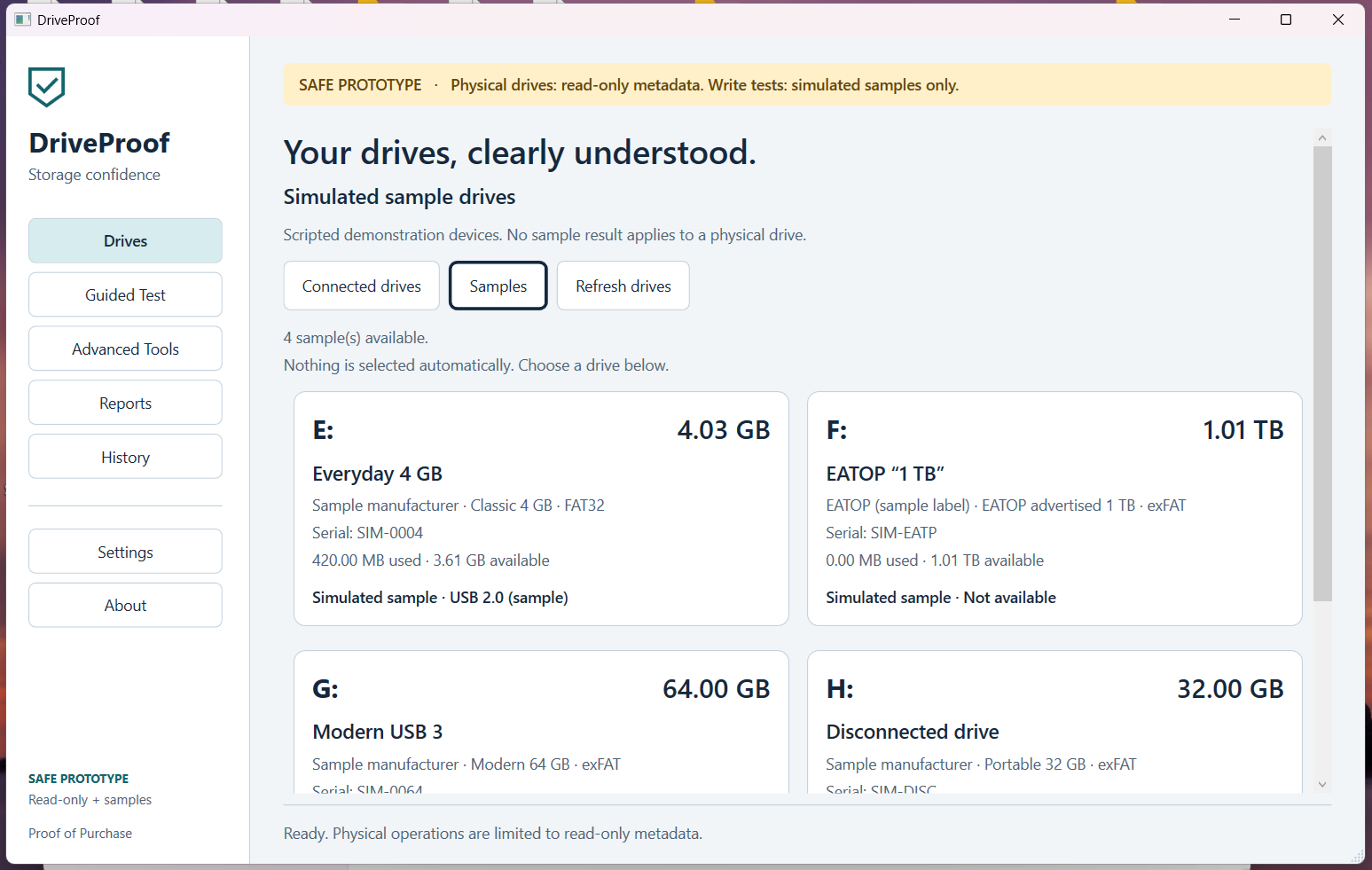
Early StorageProof Windows prototype showing simulated sample drives and read-only physical-drive safeguards
Safe prototype

A real interface, with safety limits left on.

This build can inspect physical-drive metadata in read-only mode and provides four simulated drives for developing the guided workflow, reports, history, and failure states. Write testing is simulated only at this stage.

Why the screenshot says DriveProof: this capture preserves the prototype's original working name. The application was renamed StorageProof as the broader product identity was developed.

WorkingWindows interface and navigation
WorkingSimulated drive library
LimitedPhysical drives are read-only
DisabledPhysical write tests
08 / Development

Built from a real investigation, in the open.

The project began on September 24, 2026, after the EATOP test demonstrated both the value of capacity verification and how inaccessible the current process can feel.

Lead developer

James E. Hamelton Jr.

Independent software engineer and founder of Proof of Purchase

StorageProof is being developed through JIJ Web Solutions as part of the Proof of Purchase consumer-testing project. The goal is not merely to reproduce existing utilities. It is to connect careful testing, strong safety controls, understandable results, and evidence-ready reporting in one application.

Development roadmap
Working safe prototype Windows interface, simulated drives, reports, history, and read-only physical-drive metadata.
Protected device discovery Strengthen removable-drive identification and exclusion of internal system disks.
File and performance testing Add controlled test files, speed measurement, cancellation, and cleanup.
Full capacity verification Validate the testing engine extensively with disk images before physical-drive release.
09 / Questions

What to know before release.

Can I download StorageProof now?

Not yet. Development began September 24, 2026. A safe Windows prototype is now running with simulated test drives and read-only physical-drive metadata.

Will it be free?

The core Windows installer and portable version are planned as free downloads. A paid physical toolkit USB may be offered for convenience.

Will a full test erase my files?

A complete write-and-verify test may require the entire available storage area and can erase existing data. StorageProof will explain this clearly and require explicit confirmation before writing.

Can it repair a fake drive?

It may eventually help identify a conservative smaller partition candidate, but it cannot turn defective memory into reliable memory or guarantee that a falsely programmed controller is trustworthy.

Which devices will it test?

The first release is focused on USB flash drives on Windows. The architecture is intended to allow support for memory cards and other removable storage later.

Will it upload my drive information?

No automatic upload is planned. Test history will be stored locally. Any future community-reporting feature would be optional and show the information before submission.

Storage claims deserve proof.

Follow the project as the prototype becomes a real Windows testing application.

Contact the developer